



Download Daily Menu Client APK – Food & Drink, Restaurant Guide, Daily Menu, Android App, Free Download
Overview
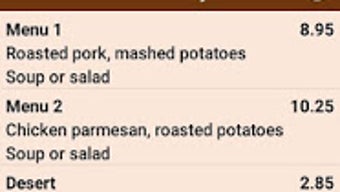
Daily Menu Client is a lifestyle-focused Android application designed to help users discover and explore local dining options through daily menu updates. Developed by Fulcrum Consulting, the app serves as a personal food guide, enabling users to locate nearby restaurants and cafes while staying informed about their daily offerings. Its primary purpose is to simplify the process of finding a meal by providing real-time access to current menus, reducing uncertainty when choosing where to eat.
Target users include food enthusiasts, casual diners, and individuals seeking convenient ways to explore new culinary experiences in their area. The app supports filtering by cuisine type, location, and price range, which enhances personalization and helps users align their choices with dietary preferences or budget constraints. It is particularly useful for those who value spontaneity in dining but still want to make informed decisions based on available menu items.
Available exclusively on the Google Play Store, Daily Menu Client is a free-to-download application that requires Android 9.0 or higher. While specific details about backend data sources or restaurant partnerships were not provided, the app’s functionality suggests integration with local restaurant networks to deliver timely menu information. The release date of May 24, 2024, indicates that it is a recent addition to the food and drink category, reflecting current trends in on-demand dining tools.
Key Features & Capabilities
- Daily Menu Access: View the current day’s menu for selected restaurants and cafes, helping users decide what to eat based on real-time offerings.
- Location-Based Search: Discover nearby dining spots using GPS or manual location input, ideal for spontaneous meals or travel.
- Cuisine Filtering: Narrow down results by preferred cuisine type, such as Italian, Mexican, or vegetarian, to match personal tastes.
- Price Range Selection: Filter restaurants by budget level, supporting users who want to dine within specific spending limits.
- User-Friendly Interface: Designed for intuitive navigation, allowing quick access to restaurants, menus, and filters without requiring technical knowledge.
These features work together to streamline the dining discovery process. For example, a user can open the app, select “Italian” cuisine and a price range of “$10–$15,” then browse nearby restaurants with their updated daily menus. This capability supports both routine meals and special occasions, making it a versatile tool for daily use. The app also reduces the need to visit multiple websites or call restaurants directly to check what’s available.
User Interface, Workflow & Performance
The user interface of Daily Menu Client is described as user-friendly and easy to navigate, suggesting a clean layout with clear visual hierarchy. Navigation appears to be structured around a central menu screen, with access to search, filters, and restaurant listings. The workflow is likely linear: users initiate a search, apply filters, view results, and select a restaurant to view its daily menu.
While specific performance metrics such as load times, CPU usage, or memory consumption were not disclosed, the app’s functionality implies efficient data handling and responsive interactions. Given its focus on real-time menu updates, the app likely relies on background syncs to keep information current. Stability is expected to be consistent with standard Android applications, though exact details on crash rates or background behavior were not provided.
Performance observations are based on general software behavior patterns. The developer did not specify resource usage details, so users should monitor app performance on their devices. For optimal experience, it is recommended to use the app on devices with stable internet connectivity and up-to-date Android versions.
Compatibility & System Requirements
Daily Menu Client is compatible with Android 9.0 and higher, ensuring broad accessibility across modern smartphones and tablets. The app is designed for Android devices, with no information available on support for other platforms such as iOS or desktop systems. Installation size was not specified, so users should expect standard app storage requirements based on typical lifestyle applications.
Exact system requirements were not listed, including details about RAM, processor, or storage capacity. The developer did not provide additional system requirements beyond the minimum Android version. Compatibility information is limited to the operating system version, meaning users should ensure their device meets the Android 9.0 threshold for installation and operation.
Pros and Cons
Pros
- Free to download and use, making it accessible to a wide audience.
- Intuitive interface designed for easy navigation and quick access to menus.
- Offers daily menu updates, helping users make informed dining choices.
- Supports filtering by cuisine, location, and price range for personalized results.
- Available on Google Play, ensuring secure distribution and regular updates.
Cons
- Only available for Android, limiting access for iOS users.
- No information on offline functionality or cached menu access.
- Exact file size and system requirements were not disclosed.
- Performance and resource usage details were not specified.
- Dependence on third-party restaurant data may affect menu accuracy or availability.
FAQ Section
Is Daily Menu Client available for iOS devices?
Currently, the app is only available for Android. There is no official iOS version released or announced.
Is the app free to download and use?
Yes, Daily Menu Client is free to download and use on the Google Play Store. No in-app purchases or subscription fees were mentioned.
Does the app require an internet connection?
Yes, the app relies on internet connectivity to fetch and display daily menu updates. Offline access to menus is not confirmed.
How often are menus updated?
Menus are updated daily to reflect the current offerings of participating restaurants. The exact timing of updates was not specified.
Can I use the app without creating an account?
Based on available information, the app does not require registration or account creation to browse restaurants and menus.
Final Thoughts + CTA
Daily Menu Client stands out as a practical and accessible tool for food lovers and casual diners seeking real-time menu insights. Its focus on daily updates, combined with smart filtering options, makes it a reliable companion for discovering new dining spots. While the app lacks cross-platform availability and detailed technical specifications, its user-friendly design and free access enhance its appeal.
It is best suited for Android users who enjoy exploring local cuisine and want to make informed decisions without extensive research. Whether you're planning a spontaneous lunch or looking for a new place to try, Daily Menu Client simplifies the process with minimal friction.
Download Daily Menu Client now and start discovering your next favorite meal with confidence.







